So Cal Surf Fishing Forums: Seaweed Tracker, Reports and More

Introducing the SFSC forums. I know there’s a discord out there and another forums website out there and that’s great. But it’s been long over due to have that option here on the go-to resource for So Cal anglers. Additionally, the one thing no forums or website or forecast tool has ever had is a means to predict which beaches are clean of seaweed and which are covered.
The SFSC forecast on this site tells you surf height, wind, and tide. That is useful, but it can’t tell you the one thing that unexpectedly ruins more sessions than anything else: seaweed. You can have perfect surf and tidal conditions and still spend the morning pulling salad off your hook every cast. I wanted a way to know the seaweed before I drove to the beach, and there was not one. So I built it.
A seaweed tracker is how this whole thing started. The fishing reports came second, but at this point they are fully built out, and the two pieces work together. Every report asks for a seaweed rating, and every rating feeds a dashboard for the county and for each beach. The more people who use it, the better the information gets for everyone. That is the whole idea.
Here is what we built, and how to use it.
So Cal Surf Fishing Forums
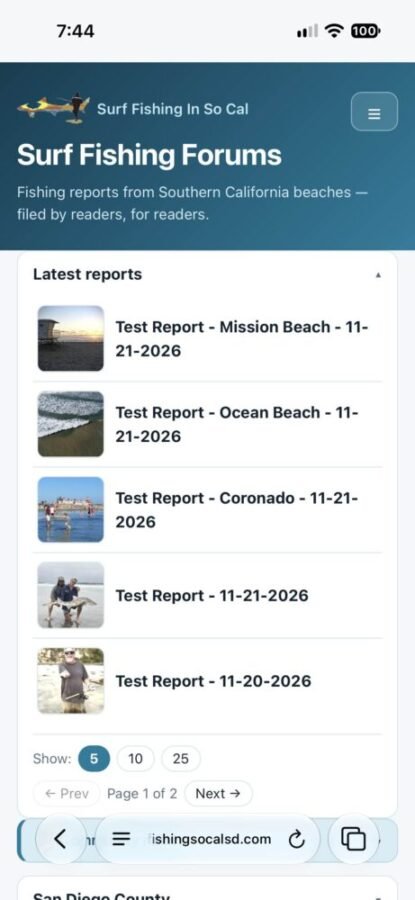
The Southern California Surf Fishing Forum covers 58 beaches and 4 bays across five counties: San Diego, Orange, Los Angeles, Ventura, and Santa Barbara. Every beach has its own page with its own reports, and every county has a dashboard that pulls it all together. There is also a General Chat for open discussion.
Additionally, if you do not wish to disclose a specific location but want to submit a report, there is a general county forum page for each county.
You do not need an account to read anything or to post, and you do not need to log in. You just pick a beach, fill out the form, and submit. Every report and message goes into a review queue, and I approve it before it shows up. That is how it works for now, and it could change later as the forums grow.
You can get there from the main menu (Blog/Reports, then Forums) or straight at https://surffishingsocalsd.com/forums/.
The County Dashboard
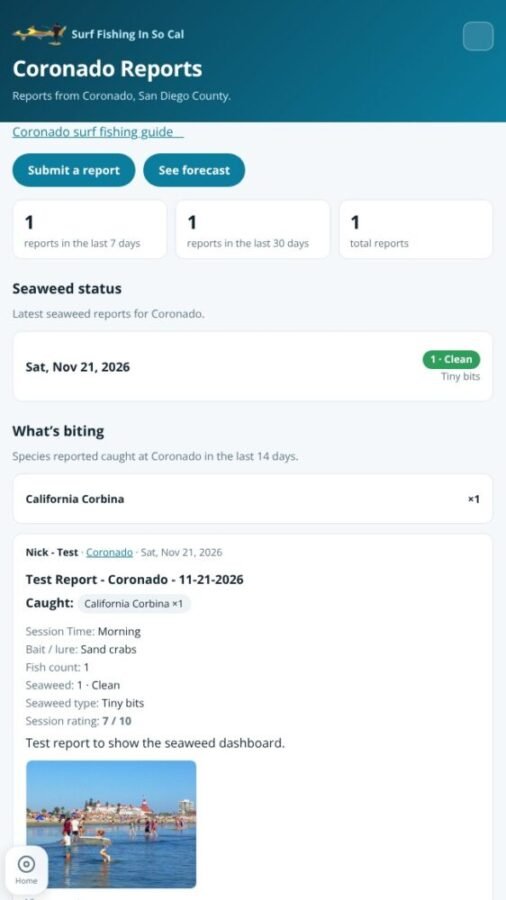
This is the part I care about most. Each county page is a dashboard, and it answers three questions at a glance: where has anyone fished lately, what are the seaweed conditions, and what is biting.
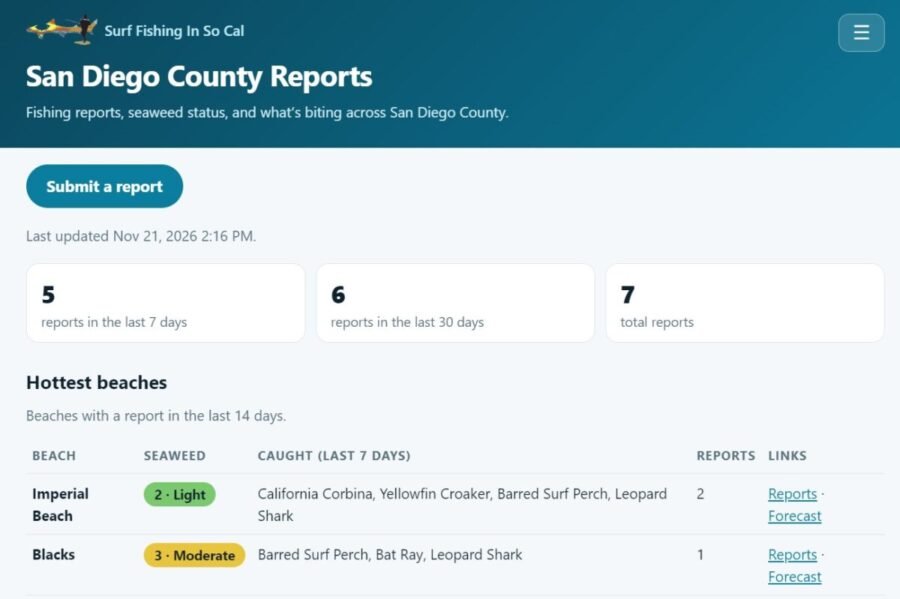
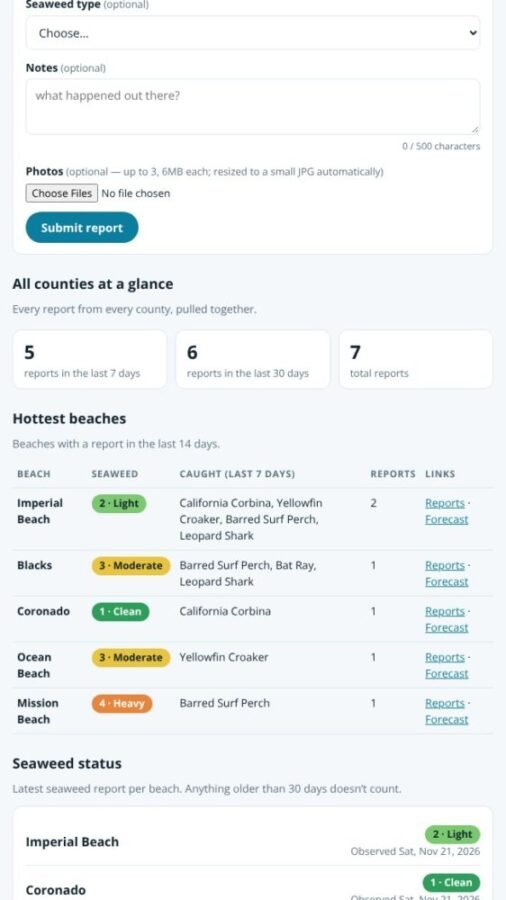
Hottest beaches. Beaches with a report in the last 14 days, ranked by how many reports came in. Each row shows the latest seaweed rating, what was caught in the last 7 days, and links to that beach’s reports and forecast.
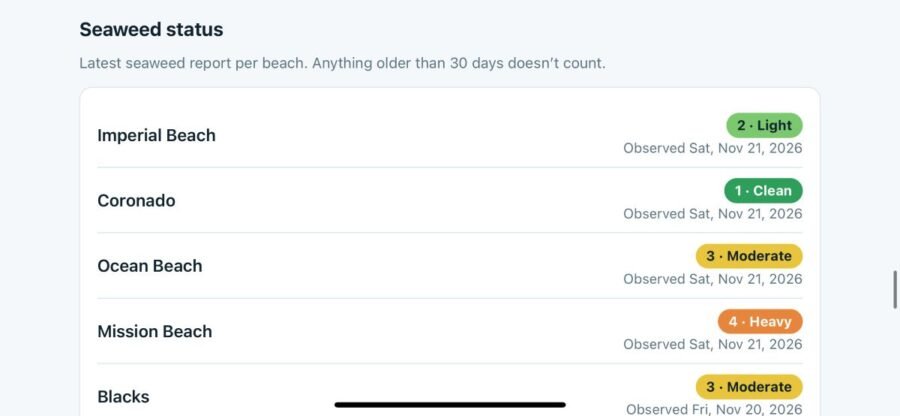
Seaweed status. This is the seaweed tracker. Every beach in the county gets a row with its latest seaweed report and the date it was observed. The scale is simple: 1 Clean, 2 Light, 3 Moderate, 4 Heavy, 5 Unfishable. Anything older than 30 days does not count, and it shows as “No recent report” instead. That way you are never looking at stale information and thinking it is current.
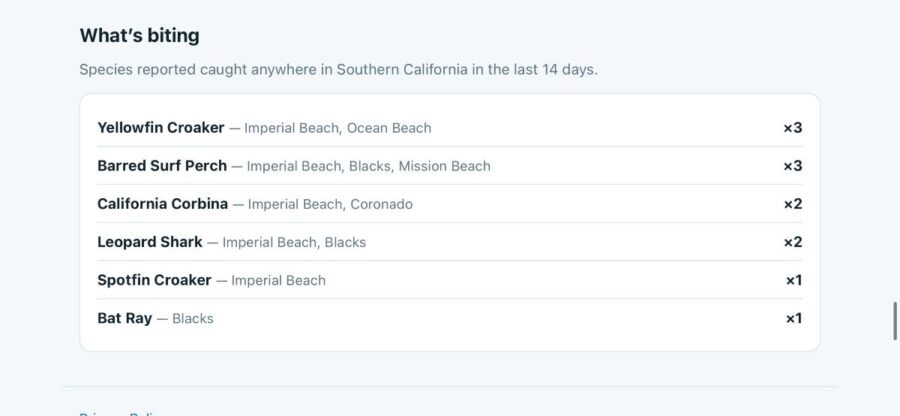
What’s biting. Every species reported caught in the county in the last 14 days, with the beach (or beaches) it came from and how many were reported.
Report counts. At the top of each county page you will see how many reports came in during the last 7 days, the last 30 days, and all time.
The idea is simple: before you pick a beach, check the county dashboard. If the seaweed is heavy at your usual spot but clean two beaches down, you know where to go. If nothing has been reported anywhere in two weeks, that tells you something too.
Beach Dashboards and the All-Counties Dashboard
The county dashboard is not the only one. Every beach page has a dashboard of its own now, in the same layout: report counts for the last 7 and 30 days and all time, the latest seaweed reports for that beach, and what has been biting there in the last 14 days.
And at the bottom of the forums home page, past the submit form, there is a combined dashboard for all five counties: the hottest beaches anywhere on the coast, the seaweed status board, and what is biting across Southern California.
What a Report Looks Like
Every beach and bay has its own page, and every report on it follows the same format, so you can scan one quickly and know what you are looking at.
Here is the first report on the forums, mine from Imperial Beach on November 11.
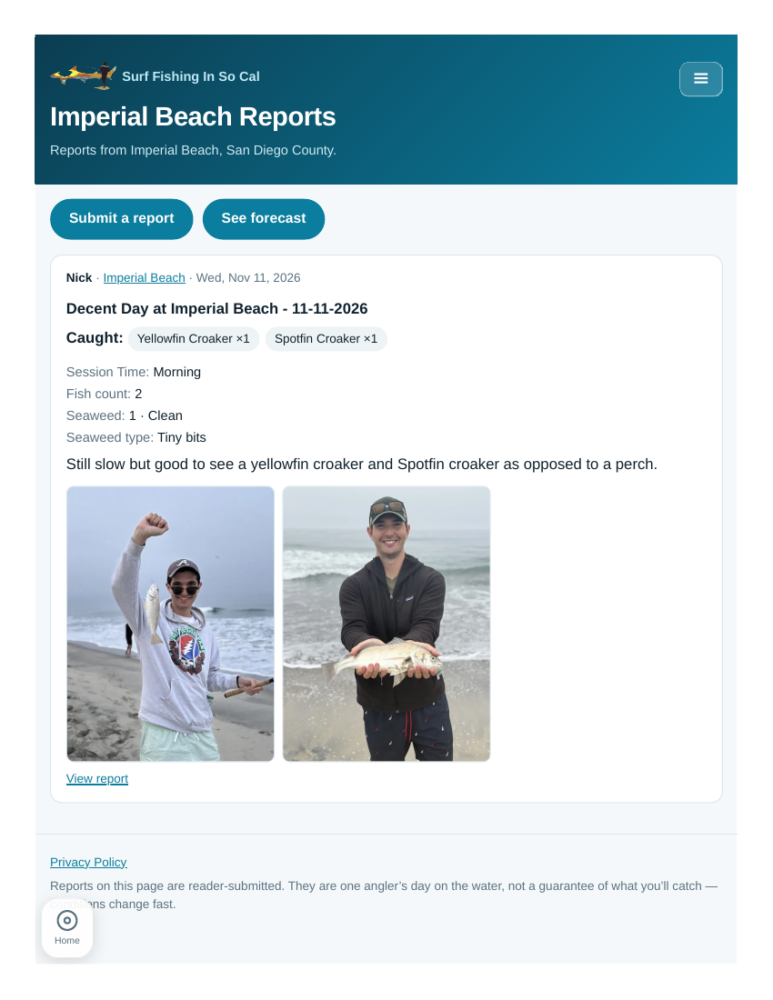
The title and the date fished come first, then who posted it and where. Then the details: what was caught (Yellowfin Croaker x1, Spotfin Croaker x1), the session (Morning), the fish count (2), the seaweed level (1, Clean), and the seaweed type (Tiny bits). Then the notes in the angler’s own words, and up to three photos.
The seaweed line is on every report, and it is the same scale everywhere: 1 Clean through 5 Unfishable, plus the type when the angler knows it (kelp, eelgrass, mixed, tiny bits, or other). That consistency is what makes the dashboard work. One person’s “a little weedy” and another person’s “loaded” do not compare, but a 2 and a 4 do.
Each beach page also has two buttons at the top: Submit a report, and See forecast, which takes you to that beach’s forecast page.
How to Submit a Report
It takes under a minute, and there is no account to create. From any beach page, hit Submit a report, or use the form at the bottom of the forums home page.
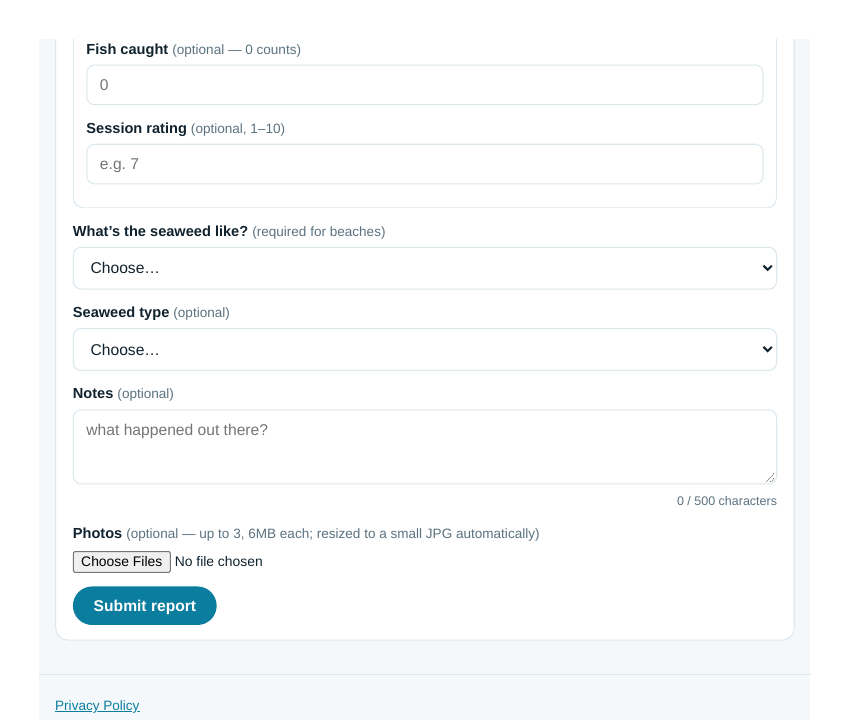
Here is what the form asks for:
Beach or bay. Pick from the list of 58 beaches and 4 bays. There is also a Custom Location option if you fished somewhere general, and a county (general) option if your report covers a whole county rather than one beach.
Date fished. The day you were out there.
Your display name. Whatever you want to be called on the report.
Title. A short headline for your session.
Email. Optional. If you add your email, we will send you a private edit link for your report. It is never shown publicly or shared.
Session. Morning, Midday, or Evening.
Species caught. A checklist of the 14 most common surf species, each with a count, plus an Other option with a write-in if you caught something else.
Bait or lure used. Optional, but helpful. Sand crabs on a Carolina rig tells the next angler a lot more than a blank.
Fish caught. The total number. If you leave it blank, it adds up your species counts.
Session rating. Optional, 1 to 10.
Seaweed level. Required for beach reports. This is the 1 to 5 scale, and it is required because it is what feeds the dashboard. For bay reports there is no seaweed field, since bays do not have the same seaweed problem.
Seaweed type. Optional. Kelp, eelgrass, mixed, tiny bits, or other.
Notes. What happened out there, in your own words, up to 500 characters.
Photos. Up to three, and they are resized automatically.
Nothing posts instantly. Every report goes into a review queue first, and I approve the legit ones and remove the spam. That keeps the forums useful instead of turning into a junk pile.
Edit Your Report
Made a typo, or caught something else after you posted? You can fix your own report.
When you submit, you get a private edit link on the confirmation page. Save it. That link is the only way to edit that report, and only the person who has it can make changes. If you add your email to the form, we will also send the link to you, so you do not have to keep track of it.
Open the link and you get the same form back, already filled in with what you submitted. Change what you need to, hit save, and the report updates right away. The beach and the photos stay as they are, but everything else (title, date, species, bait, seaweed, notes) can be edited.
That is the whole system. No account, no password, just a private link.
General Chat
Not every thought is a full report. General Chat is the open discussion board: ask a question, share a tip, or just talk fishing.
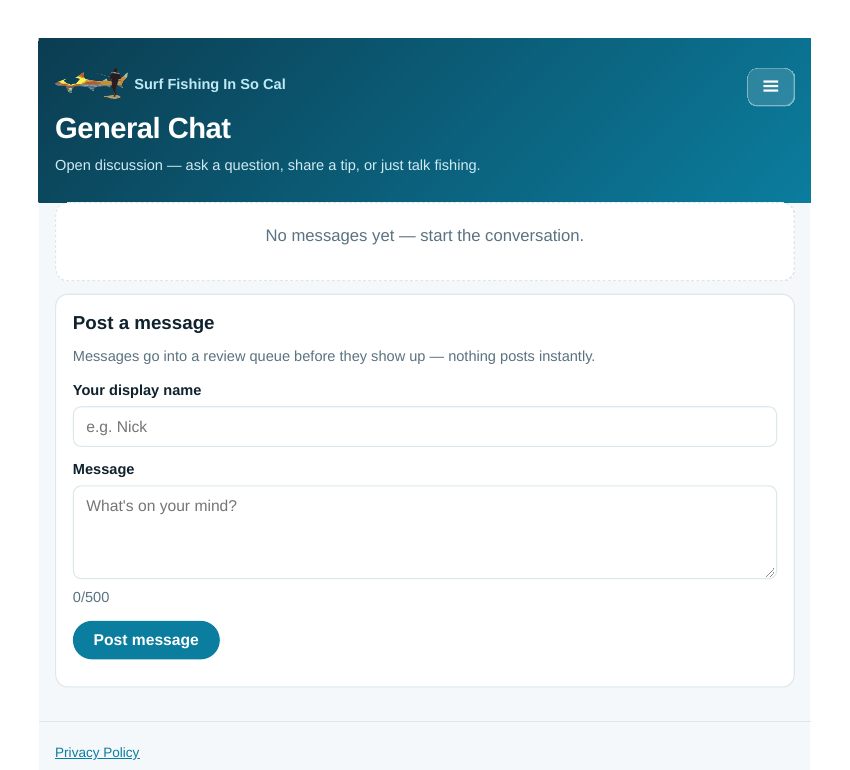
Messages are short (up to 500 characters) and go through the same review queue as reports, so nothing shows up until it has been looked at. No accounts, no threads to follow, just a running conversation.
The Rules
There are a few, and they are short. No selling or trading in reports. Reports have to name a real date and a real beach or bay or county. If you don’t want to name a specific beach, use the county general option. Photos have to be your own. Keep it friendly. That is most of it, and the full list is on the forums home page.
It Is Sparse Right Now, and That Is Where You Come In
I will be honest: as of launch, there is one report on the whole forum, mine from Imperial Beach. Most beaches on the seaweed board say “No recent report.” That is not a bug. It is a new forum, and it only gets useful when anglers actually use it.
That is the ask. The dashboard, the seaweed tracker, the what’s biting list, all of it runs on reports from people who fished. One report tells you about one beach on one day. A hundred reports tells you what the whole coast is doing. The more people who post, the better the information gets for everyone, including you the next time you are deciding where to go.
So if you fished this week, post it. If you are heading out this weekend, check the dashboard first, then come back and post what you found. That is how this becomes the thing I wanted when I started building it: a way to never show up blind again.
Submit Your First Report
The forums are live now at https://surffishingsocalsd.com/forums/. Pick your beach, fill out the form, and post your first report. I will see it in the review queue, and once it is approved, it is part of the dashboard for every angler after you.
See you out there.
The forums are new and still taking shape, so I want to hear how they are working for you. If something is not working, if a beach is missing, or if you have an idea for how to make this better, let me know.